PRESETKEY
Cross Upload
Last updated September 10, 2026.
PresetKey is an extension that runs inside Adobe Premiere Pro on Windows. Cross Upload is the part of it that publishes a marked range of the timeline to TikTok, YouTube and Instagram without leaving Premiere. The editor marks the range, presses one chord, picks the accounts, and the panel renders that range and posts it.
Cross Upload is built and runs today. It is in review with TikTok (Content Posting API), Meta (Instagram API with Instagram Login) and Google (YouTube API Services), and it reaches customers when those reviews pass. That is why presetkey.com sells it as coming soon while this page describes it working.
What the editor does
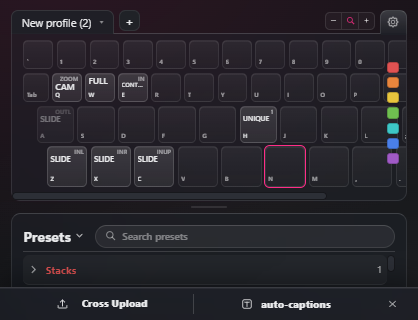
1. Mark the range. The editor sets an in point and an out point on the Premiere timeline. The dock at the foot of the PresetKey panel shows the marked range and offers two things to do with it: Cross Upload and auto-captions.
2. Open the post screen. CapsLock and Enter opens the PresetKey Crosspost window over the Program monitor. It carries a Title field, a 16:9 preview plate of the exact range being posted with its own play and pause, a description field, one row per platform, and the Upload button.
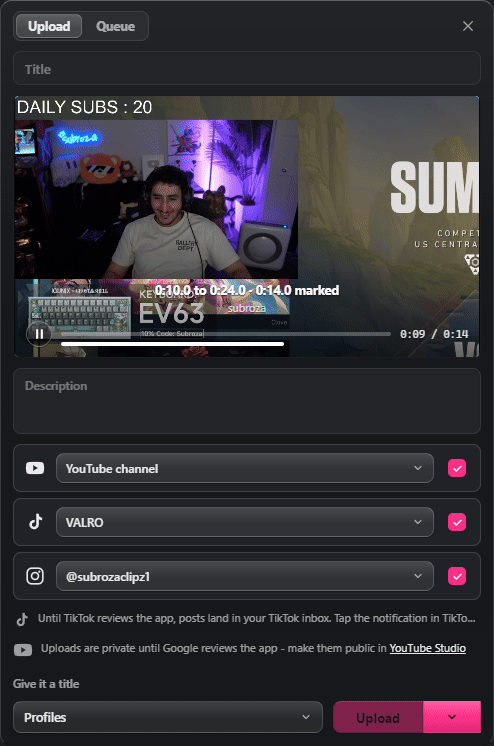
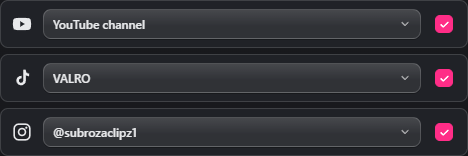
3. Choose the accounts. Each platform has its own row. A row with no account connected offers Connect, which opens the platform’s own authorisation page in the system browser. A connected row shows the handle it will post as, and a tick decides whether this post goes there. Nothing is posted to a platform whose row is not ticked.
4. Fill in what that platform needs. The rows are not identical, because the platforms are not. The TikTok block draws what TikTok requires: the creator nickname the post will appear under, a privacy setting with nothing preselected, the comment, duet and stitch switches, which are off by default and greyed out when the creator has disabled them, the commercial content disclosure with its Your brand and Branded content labels, and TikTok’s Music Usage Confirmation line. A separate AI-generated content checkbox, off by default and not part of the commercial content disclosure, sets is_aigc on the post. Upload stays disabled until a privacy setting is chosen. The YouTube row certifies the upload before it happens: “By posting, you confirm this video follows YouTube’s Community Guidelines and that you have the rights to it. Uploads are made under the YouTube Terms of Service.” It also says that uploads are private until Google reviews the app. The Instagram row says that the clip is held on presetkey.com while Instagram fetches it.
5. Upload, or schedule. Upload renders the marked range and posts it. The same button schedules instead, and a scheduled post is rendered straight away and held in the Queue on the editor’s own machine, because none of the three APIs accept a publish time from an app. PresetKey posts it when the time arrives, and the Queue says so if a slot went by while Premiere was closed. The Queue tab shows every job, its progress, and an x that cancels a scheduled one.
6. The post lands on the creator’s own account. Nothing is posted to any account other than the one the editor connected and ticked.
What each permission is used for
YouTube. One scope, https://www.googleapis.com/auth/youtube.upload, which allows uploading a video and nothing else. Connecting from presetkey.com additionally requests openid and email, and the email address is used only as the label on the connected row so that two channels can be told apart. PresetKey does not read the channel, its videos, its analytics, its comments or its subscribers. The only call made with the grant is videos.insert.
TikTok. Three scopes. user.info.basic returns the display name and avatar so the row has a label and the block can say who the post appears as. video.upload sends the clip to the creator’s TikTok inbox as a draft they finish in the TikTok app. video.publish posts it directly, and is used only once TikTok has approved the app; until then every post arrives as a draft, and the window says so in place of the privacy controls.
Instagram. Two scopes on the Instagram Login track. instagram_business_basic returns the handle and account type, and instagram_business_content_publish creates and publishes the Reel. PresetKey does not read the feed, the followers, the comments or the messages. No Facebook account and no Facebook Page are involved. Instagram allows only Professional accounts to publish through an app, and the panel says so when the connected account is a personal one.
Where the video goes
Premiere renders the marked range on the editor’s computer. YouTube and TikTok receive that file straight from the computer, and no copy passes through presetkey.com. Instagram fetches a Reel from a public link instead of accepting a file, so on that path the panel uploads that one clip to presetkey.com storage at a link that cannot be guessed, Instagram fetches it, and the panel asks for the copy to be deleted as soon as the post exists, on the success path and the failure path alike. The upload link it is issued expires after 30 minutes. The title, description and privacy setting typed in the window are sent to the platform that was ticked and nowhere else.
Connecting, and disconnecting
Every connection is made by the editor, in the platform’s own authorisation page, in the system browser. Disconnect is in the account’s Details, in the same row it was connected from. It deletes the token, clears any upload profile that used the account, and for an account connected on presetkey.com it asks the platform to revoke the token and deletes the stored row. The data deletion page documents every route, including the one that removes the licence record itself, and the privacy policy covers what is stored and where.
Contact
Questions from a platform review team, or from anyone else, go to ibra@presetkey.com.